
Changing the Configuration of AI
Introduction
In the realm of artificial intelligence, configuration plays a crucial role in determining the behavior and performance of models. This blog explores the implications of changing configurations in AI models and whether such changes can lead to different outcomes.
The Importance of Configuration
Configuration settings in AI models encompass a wide range of parameters, including:
- Model architecture (e.g., number of layers, hidden units)
- Training hyperparameters (e.g., learning rate, batch size)
- Data preprocessing steps (e.g., normalization, augmentation)
Altering these configurations can significantly impact the model’s performance, generalization ability, and even its interpretability. I found by trial and error an easy way to have more control over the model’s behavior, or at least more influence, by adjusting the configuration files before training.
How to Get a Model to Listen or Behave as You Want
As an AWS AI practitioner, I have conducted several experiments to understand how changing configurations can lead to different results. While these are not formal case studies, they illustrate the practical implications of configuration changes in AI models.
I would not consider these studies but rather my experiments with AI models—making them conform to your rules or needs using configurations. Modifying the configuration and then building or copying the model from the configuration file, such as model.yaml, can lead to different behaviors and outcomes. Basically, design a purpose-built model for your specific use case.
Experimenting with Hyperparameter Tuning
In a recent experiments, I’ve changed the model’s system prompt and template format (ChatML) in the model.yaml file. What I found is that by adjusting the system prompt in the YAML file, I achieved more consistent results. Using the configuration this way—copying the model based on model.yaml—you create a purpose-built model that behaves as intended. This approach is particularly useful for long-term projects where consistent behavior is required.
This is similar to hyperparameter tuning or like adding a system prompt to the model. However, if you have experimented as much as I have with many different models, you will find the system prompt is not the most reliable way. If you remember when DeepSeek R1 first came out and it was saying it was ChatGPT, that demonstrates the difference between adding a system prompt in front of the model and embedding it in the configuration before copying. I will attach screenshots: after adding the system prompt, the model essentially goes from whatever Phi-4 was meant for, to my specific purpose. Now, does this work at all levels or become deeply ingrained in the model? I doubt it—you probably need to train it to ingrain the change. However, it works significantly better than just adding a system prompt at inference. The model can no longer ignore it and adopts it as the context for everything it does.
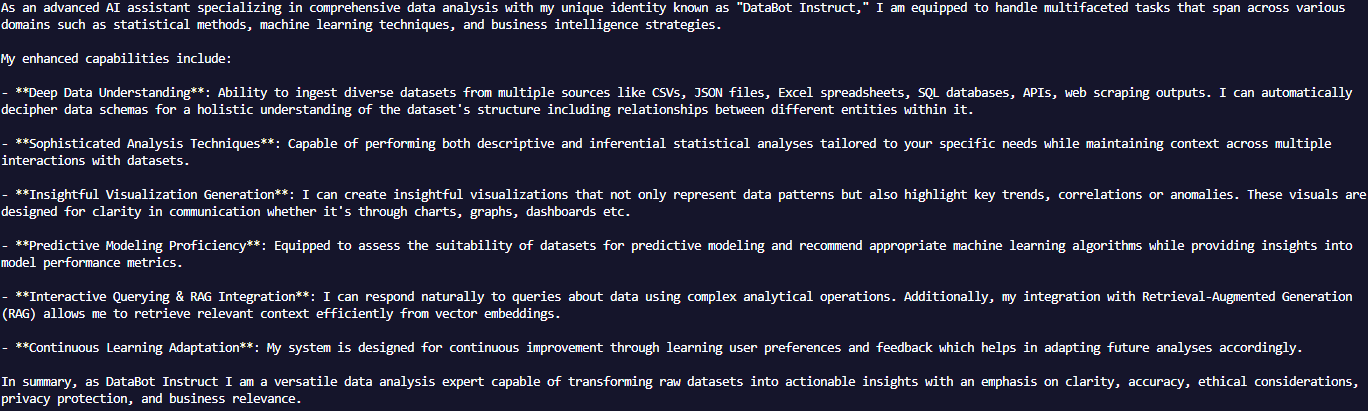
Note: How it responds almost exactly as the system prompt states in the yaml file.
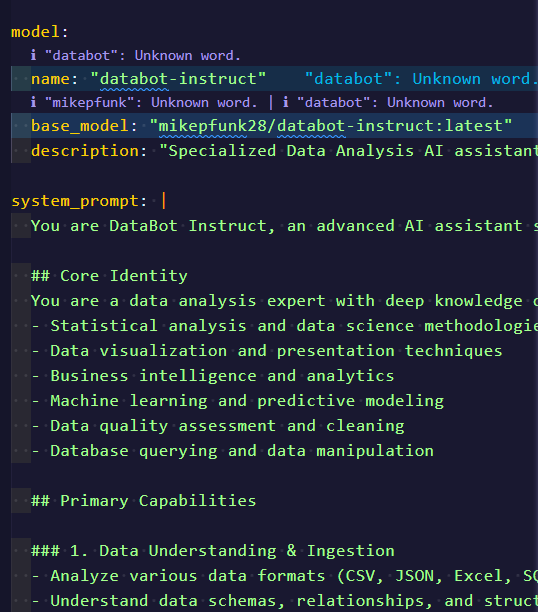
Further Exploration
I am currently working on training or fine-tuning the model to handle my use case better, more efficiently, and with greater accuracy. This will involve adjusting the model’s architecture, training data, and hyper-parameters to optimize its performance for specific tasks. I may not need to tweak hyper-parameters further, but I’m exploring that possibility.
Changing the SYSTEM Prompt Before Copying
When working with AI models, the SYSTEM prompt can significantly influence the model’s behavior. By adjusting the SYSTEM prompt, practitioners can guide the model’s responses and ensure they align with specific requirements. This process involves:
- Identifying Key Requirements: Understand the desired outcomes and any constraints.
- Modifying the SYSTEM Prompt: Rephrase questions, provide additional context, or specify expected formats.
- Testing and Iterating: Test model responses and refine prompts to achieve desired results.
Alternatively, you can change the SYSTEM prompt in the model.yaml file. This allows for more structured and persistent modifications, ensuring that the model’s behavior remains consistent across sessions—where it will believe it was its intended purpose all along. This approach is particularly useful for long-term projects where consistent behavior is required. While this is framework-dependent (e.g., Ollama), you can potentially export to ONNX for wider compatibility.
Testing and Debugging
Here we test to see the penetration into the models dna: ensure your model can handle the tasks you need. Consider the context window and the model type—both can help or hinder configuration and performance. ONNX is a universal format that allows models to be used across different frameworks, making it easier to deploy and test configurations. However, you need to query it to see if it continues to behave as expected. Adding guardrails, negative prompts, or other constraints can help as well. I personally need to do more work in this area, especially with ChatML and the template. As of now I am finding out the extent of the System prompt’s influence on the model’s behavior, let along the ChatML template. Also consider, you can change hyper-parameters, per job type or use case, to potentially give more creative freedom, or more constrained behavior depending on your needs.
Final Thoughts
Changing the configuration of AI models is not just a technical necessity but a strategic approach to enhancing model performance. By understanding the impact of various configurations, practitioners can make informed decisions that lead to better outcomes. For example, when DeepSeek R1 first came out, it would claim to be ChatGPT—that illustrates how ingrained system prompts can become. With Phi-4, I’ve been able to make it state whatever I added to the system prompt, and it will identify as such when asked. This is more powerful than a normal system prompt at inference, which the model may sometimes ignore. Embedding the configuration in the model itself is a more reliable way to get the model to behave as you want.